advertisement
HOW TO REMEMBER FORMULA AND CALCULATOR?
Try INVBAT.COM
INVenting Brain Assistant Tools


advertisement
Demonstration on how to use your smartphone as your formula and calculator tool
advertisement
VOICE DATA ENTRY
valid only for smartphone with microphone icon.
Touch clear button. Next touch any white button. Next touch microphone icon  . Next speak numbers only.
For decimal use the word "point" example say, "thirteen point seventy five" . Then touch the Solve button.
Solve for current I1, I2, and I3 Interactive Calculator
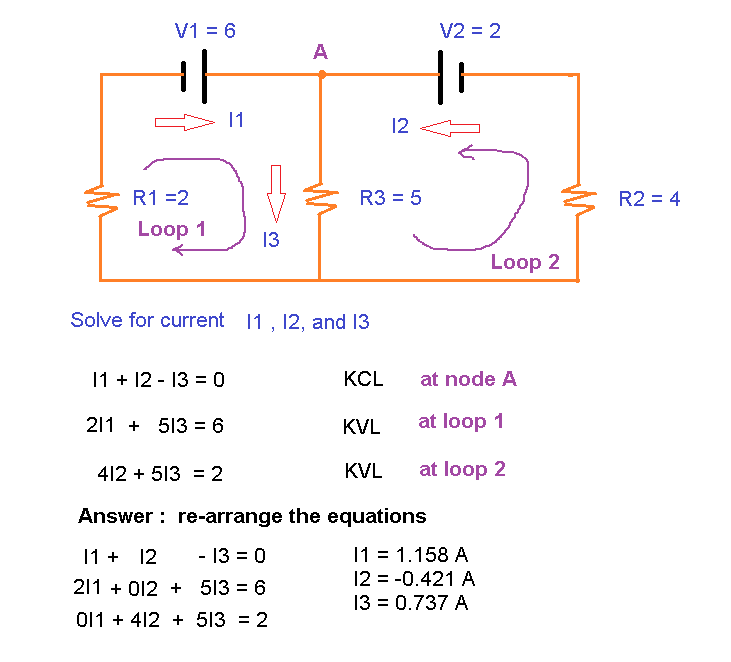
Using the calculator shown below, teachers and students can simulate different scenarios by
changing the value of R1, R3, R2, V1 and V2.
I1 +
I2
+
I3
=
Equation 1
I1 +
I2
+
I3 =
Equation 2
I1 +
I2
+
I3
=
Equation 3


Subscribe to enable calculator
Beta testing for limited time
I2 negative current only means the actual current flow is opposite to the assumed current flow. Do simulation by changing the value of R1, R2, R3, V1 and V2. Then watch the predicted current. Using the current output reading is one way to troubleshoot if there is a component problem.
Answer, I1 =
Answer, I2 =
Answer, I3 =
R1 =
R3 =
R2 =
V1 =
V2 =
Change any values for what if scenarios