
by Apolinario "Sam" Ortega
Founder of IN-V-BAT-AI
IN-V-BAT-AI introduces a natural language selective permutation invariant search retrieval system,
enabling one-click searches on a low cost tablet, laptop, and smartphone.
Before we dive into this innovation, let’s take a quick look at the evolution of information retrieval:
From the early days of basic computer searches to today’s advanced systems, the journey of information retrieval has been remarkable. Innovators like Gerard Salton and Hans Peter Luhn laid the groundwork for the sophisticated search technologies we use today.
Exploring the History and Challenges of Information Retrieval
How old is the information retrieval or search problem?
Are there known unsolved problems in information retrieval?
I’ve researched and quoted some information to answer these questions.
"Since the 1940s the problem of information storage and retrieval has attracted increasing attention." ; "The problem of effective retrieval remains largely unsolved." ; "The comparatively slow progress of modern linguistics on the semantic front and the conspicuous failure of machine translation (Bar-Hillel[5]) show that these problems are largely unsolved."
source: C. J. “Keith” van Rijsbergen, often considered one of the founders of modern Information Retrieval (IR)
From 1940s to Today: Solving Information Retrieval
Published in 1979, this book chronicles the evolution of information retrieval. With the advent of ChatGPT AI in November 2022 and the latest Generative AI using LLMs, it seems we’ve finally cracked the code on effective information retrieval. However, new challenges like data center power consumption and AI hallucinations have emerged.
IN‑V‑BAT‑AI: Practical, Hallucination‑Free Intelligence for Low‑Cost Devices
IN‑V‑BAT‑AI focuses on one thing: usefulness.
Not hype, not oversized models, not expensive cloud compute — just reliable answers delivered on low‑cost smartphones and tablets.
Zero-Hallucination Architecture
IN-V-BAT-AI avoids hallucination by design:
• deterministic matching
• strict phrase-based retrieval
• exact-match priority
• transparent scoring
• no generative guessing
Low-Cost Web Search Engine
IN-V-BAT-AI was designed to run on:
• budget Android phones
• older iPads
• school-issued Chromebooks
• low-power tablets
This makes it ideal for:
• classrooms
• rural areas
• low-bandwidth environments
• developing regions
The Power of Sorting in Computer Science
Sorting is a cornerstone of computer science, playing a vital role in indexing large datasets within inverted index database formats. This technique is crucial in modern database architectures, significantly accelerating information retrieval through natural language queries. Once full text is stored in an inverted database, a full-text search engine can retrieve information in milliseconds, making data access both efficient and swift.
Full-Text Search Explained
Full-text search is a powerful method for finding specific words or phrases within large text collections, such as documents or databases. Here’s how it works:
1. Indexing:
∘ Tokenization: The text is broken down into individual words or tokens.
∘ Stemming: Words are reduced to their root forms (e.g., "running" becomes "run").
∘ Stop Words Removal: Common words like "the" and "is" are often ignored to save space and improve search speed.
∘ Index Numbers Creation: This involves assigning a unique numerical identifier to each token. This step often follows tokenization and
is used to map tokens to their corresponding numerical representation, which are easier for machines to process.
An index is created, which is like a giant table of contents. It maps each word to the locations (documents and positions) where it appears.
2. Searching:
∘ When a user enters a search query, the algorithm looks up the words in the index.
∘ It retrieves the documents that contain the search terms and ranks them based on relevance. Relevance can be determined by factors like word frequency, proximity of search terms, and document popularity.
Example
Imagine you have a library of books. Instead of reading every book to find a specific word, you create an index. This index tells you exactly which books and pages contain the word you're looking for. When you search for "fox," the index quickly points you to all the relevant pages across all books.
Benefits
∘ Speed: Searching the index is much faster than scanning the entire text.
∘ Accuracy: Advanced algorithms can rank results by relevance, making it easier to find what you're looking for.
Applications
Full-text search is widely used in search engines like Google, document management systems, and databases. Tools like Elasticsearch and Solr are popular for implementing full-text search in applications¹².
By understanding these basics, you can appreciate how full-text search makes finding information efficient and effective.
Source: Conversation with Copilot, 9/2/2024
(1) String Search Algorithms for Large Texts | Baeldung. https://www.baeldung.com/java-full-text-search-algorithms.
(2) Full Text Search Explained - Josh Graham. https://www.joshgraham.com/full-text-search-explained/.
(3) Full-Text Search - Glossary. https://www.devx.com/terms/full-text-search/.
(4) Full-Text Search: How It Works and Why It Matters - EMB Blogs. https://blog.emb.global/learn-about-full-text-search/.
(5) Full-text search - Wikipedia. https://en.wikipedia.org/wiki/Full-text_search.
Apache Lucene, example of open source full text search engine ⤵ 👈
Sphinx, another example of open source full text search engine ⤵ 👈
AWS DynamoDB another example of full text search engine ⤵ 👈
Azure CosmoDB another example of full text search engine ⤵ 👈
Do you know the search retrieval technology use by your AI provider?
⤵ 👈
Explain full text search algorithm in 100 words.
Bing CoPilot explanation of full text search in 100 words as of 10/16/2024 
Author’s Definition with Utility Context
A full-text search algorithm is a powerful solution designed to quickly find and retrieve exact or partial matches of text strings stored in an inverted index database. This enables rapid information retrieval, typically within milliseconds.
Example of a Text Query:
Get me a quadratic equation calculator
Try it out! Copy and paste the text above into the input box below.
User input text:"how long"
Normalization does three things:
// NORMALIZATION
function normalize(str) {
return stripEntities(str)
.toLowerCase()
.replace(/[^a-z0-9\s]/g, " ")
.replace(/\s+/g, " ")
.trim();
}
convert to lowercases
removes punctuation in input
collapses extra spaces
Explanation:
Code variable letter u assigned for user text input
u = "how long"
This becomes the ground truth words used for matching.
// STRICT MATCH + SUBSTRING PRIORITY + REDUCED PREFIX
function similarity(user, target) {
const u = normalize(user);
const t = normalize(target);
const uw = new Set(u.split(" "));
const tw = new Set(t.split(" "));
Explanation:
Code variable letter uw assigned for user word text input
uw = {"how", "long"}
This becomes the ground truth words used for matching.
// REQUIRE BOTH WORDS TO MATCH
let bothWords = true;
uw.forEach(w => {
if (!tw.has(w)) bothWords = false;
});
const bothWordsScore = bothWords ? 1.0 : 0.0;
2. Word Set Construction
Your input is split into individual words:
Code
uw = {"how", "long"}
A target question like:
Code
How long is the movie?
normalizes to:
Code
t = "how long is the movie"
tw = {"how","long","is","the","movie"}
Now both sets are ready for comparison.
3. Word Overlap (Strict Matching)
❗ BOTH words must match
Otherwise the score becomes 0.
Check each word:
“how” → found
“long” → found
So:
Code
bothWords = true
bothWordsScore = 1.0
If even one word is missing, the score becomes:
Code
bothWordsScore = 0
and the entire match is rejected.
4. Substring Match (Highest Priority)
❗ Substring match must be checked first
If the full phrase "how long" appears inside the target:
Code
substringScore = 1.0
If not:
Code
substringScore = 0
This ensures exact phrase matches dominate.
5. Reduced Prefix Influence
❗ Prefix matches should be weak
So:
Code
prefixScore = 0.3 // instead of 0.9
This prevents:
Code
How many weeks are in one year?
from scoring high just because it starts with “how”.
6. No Partial Matches Allowed
❗ Partial matches are NOT allowed
So if:
bothWordsScore = 0
AND
substringScore = 0
Then:
Code
return 0
This eliminates weak fuzzy matches like:
“how many…”
“how big…”
“how tall…”
They no longer appear in your results.
8. Summary — IN-V-BAT-AI Fuzzy Logic Search Algorithm
✔ Exact phrase “how long” → perfect match
✔ Questions containing both “how” AND “long” → allowed
✔ Questions starting with “how” but missing “long” → rejected
✔ Partial matches → rejected
✔ Highlighting shows matched words in yellow
✔ Results list only contains strict matches
Built for Real‑World Usefulness
IN‑V‑BAT‑AI is engineered for:
• teachers who need reliable math question lookup
• students who need fast mastery practice
• schools that cannot afford expensive AI systems
• parents who wants safe, predictable tools
• districts that need transparent, auditabl logic
Everything is:
• deterministic
• explainable
• reproducible
• low-cost
• classroom-safe
Simple accuracy testing:
1. Copy training data shown below.
2. Paste it into search box above.
3. The expected result should be a 100% accurate retrieval of the stored information with one click. No model re-training is needed as the database continues to grow.
Error Handling:
If you see a 404 - Not Found error, it means our inverted index database does not have an exact match for the text string. As a subscriber, you can easily add your full text string query to our database. Next time you query, you can access your personalized information anytime using multiple devices.
Illustration of Selective Permutation Invariant Algorithm
Our algorithm uses parallel word clues or sets of word phrases as input to produce the same result. We call this a selective permutation invariant algorithm because a human curator selects and encodes frequently asked word combinations. Once encoded and assigned a unique number, it becomes a selective invariant permutation.
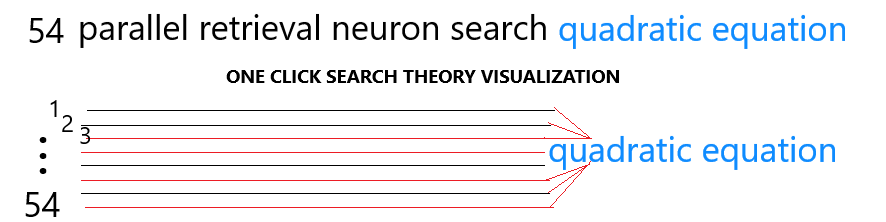
Few-Shot Learning and Selective Permutation Invariant
This process is possible using unique numbers, known in AI terminology as embedding numbers, transformer numbers, or vector numbers. By transforming or encoding word phrases into unique numbers and storing them in an inverted full-text database, we can create a fast, customized search engine using semantic search or common English language.
Advantages of Our Algorithm
1. Efficient Memory Storage:
We store only a few selections of personal collected knowledge from our subscribers, resulting in a smaller database and faster retrieval times.
2. Affordable Subscription:
For just $20 per year, you get an on-demand personal memory assistant powered by AI and cloud technology, accessible via smartphone, tablet, laptop, desktop, and smart TV.
3. Quick Availability:
Your personal memory assistant is available online within 24 hours.
4. Guaranteed Accuracy:
No hallucinations by design, as a human curator is always involved in selecting word embeddings.
Few Shot Training Data
IN-V-BAT-AI discovered how to implement natural language selective permutation invariant search retrieval system using regular CPU that make 1 click search possible.
I defined selective permutation invariant search retrieval system as returning the same output search every time the same set of words input was used irrespective of word position. I think it is one of the possible solutions to AI's explainability, traceability, and hallucination problem.

The sketch above is helpful to visualize how natural language invariant retrieval system works. Imagine all the rays of line are index of natural language database.
Mapped to a unique number in this example is 54.
Let me show you how our invariant retrieval system works. The ground truth is always the unique number 54. Try typing or saying any of string of text shown below in magenta color in input box above.
| quadratic |
| quadratic equation |
| equation quadratic |
| quadratic equation formula |
| quadratic equation calculator |
| quadratic equation reviewer |
| get quadratic equation |
| get quadratic equation formula |
| get quadratic equation calculator |
| get quadratic equation reviewer |
| get the quadratic equation formula get the quadratic equation calculator get the quadratic equation reviewer |
| get me quadratic equation formula get me quadratic equation calculator get me quadratic equation reviewer |
| get me the quadratic equation formula get me quadratic equation calculator get me quadratic equation reviewer |
| I need quadratic equation formula I need quadratic equation calculator I need quadratic equation reviewer |
| I need the quadratic equation formula I need the quadratic equation calculator I need the quadratic equation reviewer |
| show me quadratic equation formula show me quadratic equation calculator show me quadratic equation reviewer |
| show me the quadratic equation formula show me the quadratic equation calculator show me the quadratic equation reviewer |
| invbat.com get quadratic equation formula invbat.com get quadratic equation calculator invbat.com get quadratic equation reviewer |
| invbat.com get me quadratic equation formula invbat.com get me quadratic equation calculator invbat.com get me quadratic equation reviewer |
| invbat.com I need quadratic equation formula invbat.com I need quadratic equation calculator invbat.com I need quadratic equation reviewer |
| invbat.com I need the quadratic equation formula invbat.com I need the quadratic equation calculator invbat.com I need the quadratic equation reviewer |




.